
Cloud computing has transformed how organizations build, deploy, manage, and scale their technology infrastructure. Instead of purchasing and maintaining every component of an IT environment, businesses can access computing resources, development platforms, and software applications through cloud service providers. This approach reduces the need for extensive on-premises infrastructure and gives organizations greater flexibility to respond to changing business requirements. However, selecting the right cloud service model is essential to achieving these benefits without introducing unnecessary costs, operational complexity, or security risks.
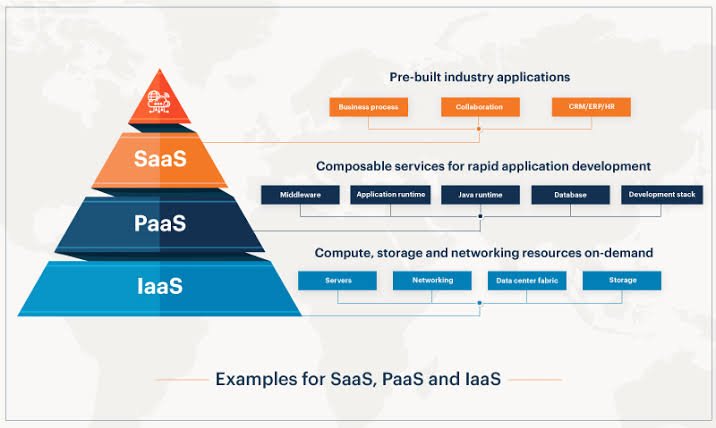
The three primary cloud service models are Infrastructure as a Service (IaaS), Platform as a Service (PaaS), and Software as a Service (SaaS). Although all three rely on cloud-based delivery, they differ in the level of control they provide and the amount of technical management expected from customers. IaaS offers virtualized infrastructure, PaaS provides an environment for building and deploying applications, and SaaS delivers ready-to-use software over the internet.
Understanding IaaS vs. PaaS vs. SaaS helps organizations align their cloud investments with their technical capabilities, application requirements, and long-term business objectives. A company modernizing legacy applications may need the control offered by IaaS, while a software development team may prefer PaaS to accelerate application delivery. An organization seeking email, collaboration, customer relationship management, or human resources software may find SaaS more practical.
There is no universally superior cloud service model. The right choice depends on what an organization wants to build or use, how much control it needs, and which responsibilities it is prepared to manage. This guide explains how IaaS, PaaS, and SaaS work, compares their benefits and limitations, and provides a practical framework for choosing the right model.
What Is Infrastructure as a Service (IaaS)?
Infrastructure as a Service, or IaaS, provides fundamental computing resources through a cloud provider. These resources typically include virtual machines, storage, networking, and other infrastructure capabilities that organizations can provision on demand. Rather than purchasing physical servers and building an entire data center, businesses can rent the infrastructure they need and scale it as requirements change.
With IaaS, the cloud provider generally manages the physical data centers, servers, networking hardware, and virtualization layer. Customers usually remain responsible for managing their operating systems, installed applications, data, identity configurations, and many security settings above the infrastructure layer. The exact division of responsibilities depends on the service and its configuration.
For example, a business running a legacy enterprise application may use IaaS to migrate its workloads from an on-premises data center to cloud-hosted virtual machines. The organization can select an appropriate operating system, install required software, configure network access, and control application-level settings without purchasing physical hardware. This can simplify infrastructure expansion while preserving substantial technical flexibility.
IaaS is particularly useful when organizations need control over operating systems, network architecture, storage configurations, or specialized workloads. It can also support development environments, disaster recovery, testing, and applications that are difficult to move directly to a fully managed platform.
However, this flexibility comes with operational responsibility. IT teams must plan patching, capacity management, monitoring, backup policies, access controls, and infrastructure security. Poorly configured resources can also lead to unexpected cloud spending. IaaS reduces the burden of managing physical infrastructure, but it does not eliminate the need for capable infrastructure and security teams.
Key Benefits of IaaS
IaaS offers significant flexibility because organizations can provision computing resources without waiting for physical hardware procurement. Capacity can be increased or reduced as demand changes, making it suitable for workloads with variable resource requirements. Businesses can also select configurations that fit specific technical and performance needs.
Another advantage is support for infrastructure modernization. Organizations can migrate existing applications to virtual machines without completely redesigning their software architecture. This can provide a transitional step toward broader cloud adoption, although some applications may require substantial modernization to achieve cloud-native benefits.
IaaS can also support more flexible disaster recovery and business continuity strategies. Cloud-based infrastructure can be deployed across different availability zones or regions where supported, reducing dependence on a single physical location. However, resilience is not automatic; organizations must design, test, and fund appropriate recovery arrangements.
Limitations of IaaS
The primary limitation of IaaS is that customers retain considerable management responsibility. Operating systems, application dependencies, security configuration, and workload optimization may require specialized expertise. Organizations that lack these capabilities can find that infrastructure management consumes more time than expected.
Costs can also become difficult to predict if teams leave resources running unnecessarily, overprovision virtual machines, or overlook storage and data-transfer charges. Effective cost governance, automated shutdown policies, resource tagging, and regular usage reviews help organizations control these risks.
What Is Platform as a Service (PaaS)?
Platform as a Service, or PaaS, provides a managed environment for developing, testing, deploying, and running applications. Instead of managing virtual machines and configuring every layer of the application environment, developers can focus primarily on application code, business logic, and data.
The provider manages much of the underlying infrastructure and platform components, which may include operating systems, runtime environments, middleware, scaling mechanisms, and application hosting services. Depending on the product, managed databases, deployment pipelines, monitoring, and integration tools may also be available. The exact capabilities and customer responsibilities vary across platforms.
For example, a development team building an online booking application could use a PaaS offering to deploy its code without manually configuring servers or maintaining the underlying operating system. The platform may provide application hosting, automated deployment, health monitoring, and scaling features. Developers can therefore spend more time improving the application and less time managing the environment in which it runs.
PaaS is especially useful for organizations that develop custom applications, build APIs, create internal business tools, or modernize software delivery processes. It can improve consistency between development and production environments and reduce the amount of infrastructure engineering required for routine deployments.
However, PaaS can introduce platform dependency. Applications may rely on provider-specific runtimes, APIs, deployment mechanisms, or managed services that are difficult to reproduce elsewhere. Organizations should evaluate portability, supported programming languages, performance limits, integration requirements, and data-export options before committing to a platform.
Key Benefits of PaaS
PaaS can accelerate development by reducing the setup and maintenance work associated with application infrastructure. Developers can use standardized environments and managed deployment capabilities rather than building each environment from scratch. This is particularly valuable for teams delivering frequent application updates.
PaaS can also improve operational consistency. Standardized runtime environments, built-in monitoring, and integrated deployment features can reduce configuration differences between development, testing, and production. Managed scaling capabilities may help applications respond to changing demand without requiring teams to manually provision every infrastructure component.
Another benefit is that PaaS supports collaboration between development and operations teams. When combined with version control, automated testing, and CI/CD pipelines, it can help organizations establish repeatable application delivery workflows.
Limitations of PaaS
PaaS typically offers less low-level control than IaaS. Developers may have limited access to operating system settings, network internals, or runtime configurations. This can be restrictive for applications that depend on specialized software, unusual system libraries, or highly customized environments.
Provider dependency is another consideration. Migrating an application between platforms may require changes to deployment configurations, identity integrations, storage services, or application code. Organizations can reduce this risk by documenting dependencies, using portable technologies where appropriate, and avoiding unnecessary reliance on proprietary features.
PaaS also does not remove customer responsibility for application security. Developers still need to secure application code, manage permissions, protect secrets, validate inputs, and configure access to data and services correctly.
What Is Software as a Service (SaaS)?
Software as a Service, or SaaS, delivers complete software applications through the internet. Users generally access these applications through a web browser, desktop client, or mobile application, while the provider manages the underlying infrastructure, application hosting, and much of the software maintenance.
Examples of SaaS include email and collaboration platforms, customer relationship management systems, project management applications, human resources information systems, and cloud-based accounting tools. Organizations usually subscribe to a service based on the number of users, selected features, usage levels, or another pricing arrangement.
Consider a company implementing a customer relationship management system. Instead of purchasing servers, installing the application, and maintaining software updates, the company can subscribe to a SaaS CRM platform. Sales teams can manage contacts, track opportunities, record customer interactions, and generate reports through a centrally managed application. The provider handles much of the technical operation, while the customer configures business processes, users, permissions, and data.
SaaS is particularly attractive when businesses need established software capabilities quickly and do not want to maintain the underlying application infrastructure. It allows organizations to adopt business applications without building every function internally.
Nevertheless, SaaS customers still have important responsibilities. They must manage user access, configure security settings, protect sensitive information, review integrations, and understand data retention and export policies. They should also evaluate service availability, contractual commitments, compliance requirements, and the consequences of changing providers.
Key Benefits of SaaS
SaaS reduces the need for internal teams to install, patch, and maintain application infrastructure. Providers generally deliver updates centrally, allowing users to access supported features without managing individual application installations in the traditional way.
It can also shorten implementation time. Organizations can often configure an existing application faster than they could develop a comparable system from scratch. Subscription-based pricing may make budgeting and initial adoption simpler, although total costs depend on licensing, customization, integrations, data storage, and long-term usage.
SaaS supports distributed work because users can access applications from different locations and devices, subject to the provider’s access controls and service requirements. Centralized administration can also simplify user onboarding and collaboration across departments.
Limitations of SaaS
The principal limitation of SaaS is reduced control over the underlying software. Customers may be restricted to the features, customization options, and release schedules offered by the provider. Highly specialized business processes may not fit neatly into a standardized application.
Data governance and integration also require attention. Organizations should understand where information is stored, how it is processed, which third parties can access it, and how it can be exported when the contract ends. SaaS adoption should include a review of identity controls, audit capabilities, retention policies, and relevant contractual terms.
Finally, recurring subscription costs can increase as organizations add users, premium features, or additional services. Businesses should evaluate total cost of ownership rather than assuming that a subscription is always cheaper than building or hosting a solution internally.
IaaS vs. PaaS vs. SaaS: Key Differences
The main difference between these models is the balance between customer control and provider-managed services. IaaS provides the greatest control over the software environment, PaaS reduces infrastructure management for application developers, and SaaS offers complete applications for end users.
| Comparison factor | IaaS | PaaS | SaaS |
|---|---|---|---|
| Primary offering | Virtualized infrastructure | Application development and hosting platform | Ready-to-use software |
| Typical users | IT and infrastructure teams | Developers and engineering teams | Business users and application administrators |
| Customer control | High over operating systems and workloads | Primarily over application code and configuration | Primarily over application settings and data |
| Provider management | Physical infrastructure and virtualization | Infrastructure and much of the application platform | Infrastructure and the application service |
| Maintenance effort | Relatively high | Moderate to low for underlying platform | Generally low for underlying software |
| Customization | Extensive at infrastructure and software levels | High within platform capabilities | Usually limited to supported configuration and extensions |
| Typical use cases | Legacy application hosting, custom environments, disaster recovery | Web applications, APIs, application development | CRM, email, collaboration, HR and finance software |
| Main consideration | Infrastructure operations and cost control | Platform constraints and portability | Vendor dependency, data governance and licensing |
The table provides a general comparison. Actual responsibilities differ by provider and product, and some services combine characteristics of multiple models. Managed Kubernetes, serverless platforms, managed databases, and hosted application services, for example, can blur the boundaries between traditional categories.
How to Choose the Right Cloud Service Model
Selecting the right model begins with the business outcome rather than the technology label. Organizations should identify what they need to operate, build, or consume before comparing providers. The decision should account for existing systems, internal skills, security requirements, scalability expectations, and long-term operating costs.
Choose IaaS When Control and Flexibility Matter
IaaS is a strong option when applications require control over operating systems, infrastructure configuration, networking, or software dependencies. It is often appropriate for organizations migrating existing workloads to the cloud without immediately redesigning the applications.
For example, a company running a legacy enterprise resource planning system may choose cloud virtual machines because the application depends on a specific operating system or configuration. IaaS allows the company to move the workload while retaining control over much of its software environment.
Before selecting IaaS, confirm that the organization can manage patching, monitoring, backups, identity controls, and resource optimization. If these responsibilities exceed the team’s capabilities, a more managed service may be preferable.
Choose PaaS When Faster Application Development Is the Priority
PaaS is well suited to teams that build custom software and want to minimize routine infrastructure management. It is particularly valuable when developers need reliable deployment environments, managed runtimes, and the ability to scale applications without manually managing every server.
A retail organization developing a new customer-facing application, for example, could use PaaS to deploy features rapidly while the provider manages much of the hosting environment. The development team can concentrate on user experience, integrations, application reliability, and business functionality.
Before committing to PaaS, assess supported languages, framework compatibility, deployment controls, networking capabilities, performance limits, and exit options. These factors help determine whether the platform can support the application over its expected lifetime.
Choose SaaS When You Need a Ready-to-Use Application
SaaS is generally the most suitable option when the organization needs a business capability that is already available as a managed application. Examples include team collaboration, sales management, recruitment, payroll, document management, and accounting.
A growing business might adopt a SaaS HR platform to manage employee records, leave requests, onboarding, and performance processes without building a custom HR application. The provider maintains the software service, while internal administrators configure workflows, roles, integrations, and policies.
Before choosing SaaS, evaluate the application’s fit with existing business processes, security controls, integration options, data portability, service availability, and licensing structure. The simplest service to adopt initially may not be the best long-term choice if it cannot support future requirements.
Security and Shared Responsibility Across Cloud Models
Security is a critical consideration across IaaS, PaaS, and SaaS. Moving workloads to the cloud does not automatically make them secure. Cloud providers and customers have different responsibilities, and the division depends on the selected service and the way it is configured.
In IaaS environments, providers typically secure the physical infrastructure and virtualization layer, while customers manage many operating system, application, identity, and network configurations. This gives customers considerable control, but it also means they must operate a broader set of security controls.
PaaS shifts more infrastructure and runtime maintenance to the provider. Customers still need to protect application code, configure permissions, secure credentials, and manage access to data and integrated services. Developers should incorporate secure coding practices, dependency scanning, and appropriate testing into their delivery pipelines.
With SaaS, providers manage the application service and underlying infrastructure, but customers remain responsible for many configuration and governance decisions. Weak authentication, excessive permissions, unsafe sharing settings, and poorly controlled integrations can expose sensitive information even when the provider maintains the platform appropriately.
Organizations should establish clear policies for identity and access management, multifactor authentication, encryption, logging, incident response, and data retention. They should also review provider security documentation, compliance commitments, contractual responsibilities, and recovery arrangements. Security ownership should be explicitly documented rather than assumed.
Cost Considerations: Looking Beyond the Subscription Price
The cost of a cloud service model depends on more than the advertised price. Organizations should compare total cost of ownership, including direct service charges, implementation, integration, administration, support, training, security, and migration expenses.
IaaS costs may include compute instances, storage, network traffic, backups, monitoring, and support. Teams must also account for the labor required to configure and maintain workloads. Right-sizing resources, selecting appropriate purchasing options, and removing unused infrastructure can help control spending.
PaaS costs may be based on application instances, execution time, database consumption, storage, requests, or other platform-specific measures. Although the provider manages more of the underlying environment, poorly optimized applications and unexpectedly high usage can still increase costs. Development teams should monitor consumption and set appropriate budgets and alerts.
SaaS pricing often depends on users, feature tiers, storage, transactions, or contractual commitments. Costs can rise as the organization expands or requires premium capabilities. Integration work, migration from existing systems, and additional administrative controls can also affect the total investment.
A meaningful comparison should consider the full operating model. IaaS may offer more control but require additional engineering effort; PaaS may reduce maintenance while introducing platform constraints; and SaaS may simplify application management while limiting customization. The best financial choice is the one that meets business requirements at an acceptable total cost and risk level.
Can Organizations Combine IaaS, PaaS, and SaaS?
Organizations do not need to choose a single cloud service model for every workload. In practice, many enterprises use a combination of IaaS, PaaS, and SaaS because different business needs require different levels of control and management.
For example, a company might use IaaS to host a specialized legacy application, PaaS to build new customer-facing services, and SaaS for email, collaboration, sales operations, and HR management. This approach allows teams to choose a model based on the requirements of each workload instead of forcing every system into the same architecture.
However, a mixed environment can increase integration and governance complexity. Data may move between multiple providers, identity policies may differ, and monitoring information may be spread across separate systems. Organizations should establish consistent access controls, integration standards, cost monitoring, data classification, and ownership responsibilities across their cloud environment.
A practical approach is to maintain an inventory of applications, identify their dependencies, and classify them according to business criticality, customization needs, security requirements, and modernization opportunities. This helps organizations decide which systems should remain on infrastructure services, which can move to managed platforms, and which business functions are better served by SaaS.
Common Mistakes to Avoid When Selecting a Cloud Model
One common mistake is choosing a model based only on its initial price. A low-cost infrastructure service may require substantial administration, while a SaaS subscription may become expensive as user counts increase. Comparing total ownership costs provides a more reliable basis for decision-making.
Another mistake is assuming that greater control is always better. Although IaaS provides flexibility, organizations may not need that flexibility for routine business applications. Managing infrastructure that does not differentiate the business can divert technical teams from higher-value work.
Organizations can also underestimate vendor dependency. Proprietary APIs, data formats, integrations, and deployment configurations may make future migration more difficult. Evaluating portability and exit arrangements early can help reduce the risk of becoming overly dependent on one provider.
Finally, businesses sometimes overlook security and operational ownership. Even managed services require customer decisions about identity, permissions, data handling, and monitoring. Clear responsibility assignments, documented procedures, and periodic reviews help prevent gaps between provider capabilities and customer expectations.
Conclusion
Choosing between IaaS, PaaS, and SaaS is fundamentally a decision about control, convenience, and responsibility. IaaS provides flexible infrastructure for organizations that need significant technical control. PaaS enables development teams to build and deploy applications without managing as much of the underlying environment. SaaS provides complete applications that businesses can adopt with comparatively little infrastructure administration.
The most appropriate cloud service model depends on the workload, internal expertise, security requirements, customization needs, and long-term operating costs. Organizations should evaluate these factors alongside performance, integration, portability, and governance before making a commitment.
For many enterprises, the strongest strategy is a carefully governed combination of cloud service models. By matching each workload to the appropriate level of abstraction, businesses can modernize their technology environments, improve delivery speed, and use engineering resources more effectively.