

Modern businesses operate across multiple departments, systems, and workflows, from finance and human resources to procurement, inventory, sales, and supply chain management. When these functions rely on disconnected software applications and manually maintained spreadsheets, organizations often struggle with inconsistent data, delayed reporting, duplicated work, and limited visibility into business performance. These challenges become more complex as companies expand into new markets, introduce additional products, or manage increasingly distributed operations.
Enterprise Resource Planning (ERP) systems help address these challenges by integrating essential business processes into a coordinated technology platform. Instead of maintaining separate systems for every department, an organization can use an ERP solution to connect operational data, standardize workflows, automate routine activities, and provide a more consistent view of business performance. This integration helps employees access relevant information while enabling management teams to make decisions based on shared business data.
Understanding ERP systems is important for organizations planning digital transformation, improving operational efficiency, or replacing fragmented legacy applications. Modern ERP platforms can support financial management, human capital management, manufacturing, inventory, procurement, customer orders, reporting, and other business functions. Depending on the product, these capabilities may be delivered through a single integrated suite or through connected modules.
However, implementing ERP software involves more than selecting a product and migrating existing records. Businesses must understand their processes, define implementation goals, prepare their data, manage organizational change, and establish appropriate security and governance controls. A successful ERP strategy aligns technology with business requirements rather than forcing teams to adopt software without considering how work actually happens.
This guide explains what ERP systems are, explores their core features and modules, examines their benefits and limitations, and outlines how organizations can select and implement an ERP solution effectively.
What Is an ERP System?
An Enterprise Resource Planning system is business software that integrates and manages processes across different organizational functions. It typically uses a shared data model and connected workflows to help departments coordinate activities and exchange information more consistently.
For example, when a sales team receives a customer order, the ERP system may help verify product availability, initiate fulfillment, update inventory records, generate billing information, and record the financial transaction. Instead of requiring employees to enter the same information into several independent applications, integrated workflows can reduce duplication and improve traceability.
ERP systems commonly support finance, procurement, inventory, sales order management, manufacturing, human resources, and reporting. Some platforms also provide capabilities for project management, asset maintenance, quality control, customer relationship management, and supply chain planning. The exact scope depends on the vendor, product edition, selected modules, and integrations.
ERP software can be deployed in several ways. On-premises ERP runs on infrastructure managed by the organization, while cloud ERP is hosted by a provider and accessed through supported networks and applications. Hybrid deployments combine cloud services with systems retained within the company’s own environment. Each approach has different implications for customization, infrastructure management, data governance, and operating costs.
The primary purpose of ERP is not simply to store information in one place. It is to connect business activities so that transactions, operational updates, and management reports reflect a more consistent view of the organization. When implemented effectively, ERP becomes a foundation for process standardization, operational coordination, and business planning.
Key Features of ERP Systems
ERP platforms differ in complexity and industry focus, but many share a common set of features designed to improve coordination, automate business activities, and support informed decision-making.
1. Centralized Data Management
A central data model helps different departments work with consistent information about customers, suppliers, products, employees, financial transactions, and inventory. When properly configured, changes made through one business process can become available to other authorized processes without repeated manual entry.
For example, a change to a supplier record may be reflected in purchasing workflows and accounts payable processes. This reduces the likelihood of departments maintaining conflicting versions of important business information. However, centralized data does not automatically guarantee accuracy; organizations still need validation rules, ownership responsibilities, and data-quality controls.
2. Workflow Automation
ERP systems can automate repetitive tasks such as purchase approvals, invoice processing, order routing, employee expense submissions, and inventory updates. Rules determine how a transaction moves through the workflow, who must approve it, and what actions occur after approval.
Automation can reduce administrative effort and improve process consistency. It can also create an audit trail showing who initiated, reviewed, approved, or modified a transaction. Businesses should nevertheless review automated workflows periodically to ensure that approval rules remain appropriate as responsibilities and policies change.
3. Real-Time or Timely Reporting
ERP platforms collect transactional information across multiple business functions, allowing managers to monitor operational and financial performance through reports and dashboards. Depending on the architecture and configuration, information may be available immediately, periodically, or after scheduled processing.
Finance teams can review outstanding receivables and expenses, warehouse managers can monitor inventory levels, and procurement teams can track open purchase orders. Shared reporting can help teams identify discrepancies earlier and respond more effectively to changing conditions.
4. Role-Based Access Control
ERP systems often provide role-based permissions that determine which records, transactions, and functions users can access. A payroll specialist may be authorized to process salary information without receiving broad access to unrelated financial or customer records. Similarly, purchasing employees may create purchase orders while higher-value transactions require additional approval.
Access controls help protect sensitive information and support separation of duties. Organizations should review permissions regularly, remove access when employees change roles, and monitor privileged accounts to reduce the risk of unauthorized activity.
5. Integration Capabilities
ERP systems often integrate with external applications such as customer relationship management platforms, e-commerce systems, payroll services, warehouse management tools, payment gateways, and analytics platforms. APIs, connectors, middleware, and event-driven integrations can help synchronize information across these systems.
Effective integration allows organizations to preserve specialized applications while maintaining consistent business processes. However, integration design must account for data ownership, error handling, security, synchronization delays, and changes to connected systems.
6. Scalability and Configuration
ERP platforms can support business growth by allowing organizations to add users, business units, locations, workflows, or modules as requirements evolve. Cloud-based products may also provide managed infrastructure capacity and standardized software updates, depending on the service.
Scalability requires more than increasing technical capacity. Organizations must ensure that workflows, data structures, reporting, access controls, and operating procedures remain effective as the business expands.
7. Audit Trails and Compliance Support
Many ERP systems maintain transaction histories, approval records, and change logs that help organizations investigate discrepancies and demonstrate control over business processes. Financial systems may also support reporting structures and controls relevant to applicable accounting standards and regulatory requirements.
An ERP platform does not guarantee compliance by itself. Businesses must configure the system appropriately, maintain supporting documentation, train users, and periodically test whether controls work as intended.
Essential ERP Modules and Their Functions
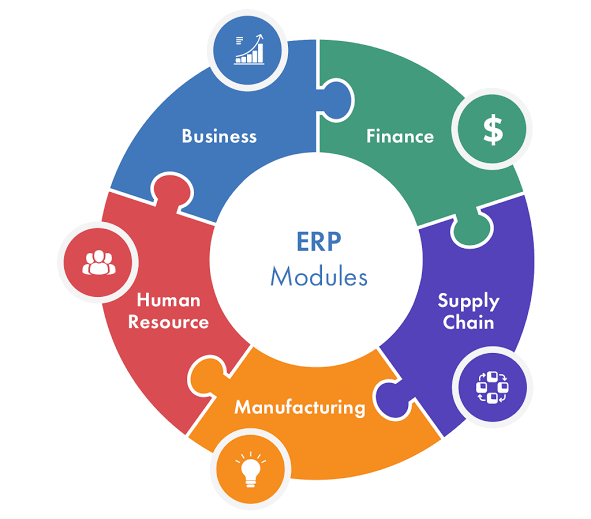
ERP systems are usually organized into functional modules. Each module supports a particular business area while sharing relevant information with other parts of the platform. Organizations can implement the modules they need, depending on the software’s architecture and licensing model.
1. Financial Management
The financial management module supports general ledger accounting, accounts payable, accounts receivable, budgeting, cash management, fixed assets, and financial reporting. It helps organizations record transactions, manage financial obligations, and prepare reports that support business planning.
For example, when an organization receives a supplier invoice, the system can connect the invoice to a purchase order and goods receipt, where applicable. After the required checks and approvals, the transaction can be recorded in the appropriate financial accounts. This creates a clearer relationship between operational purchasing activities and financial reporting.
2. Human Resource Management
The human resources module manages employee records, organizational structures, attendance, leave, compensation information, and other workforce-related processes, depending on the product. Some ERP platforms include comprehensive HR capabilities, while others integrate with dedicated human capital management systems.
Connecting workforce information with finance and operations can improve headcount planning, payroll accounting, labor-cost analysis, and workforce reporting. Sensitive employee data requires careful access controls, retention policies, and compliance with applicable employment and privacy requirements.
3. Inventory and Warehouse Management
Inventory modules track stock quantities, product movements, warehouse locations, receipts, issues, transfers, and reorder requirements. More advanced warehouse management capabilities may support barcode scanning, picking, packing, cycle counting, and warehouse task optimization.
Accurate inventory information helps businesses reduce stock discrepancies, identify slow-moving items, and coordinate replenishment. Organizations with complex warehousing needs may still require a specialized warehouse management system integrated with the ERP platform.
4. Procurement and Supplier Management
Procurement modules help organizations manage supplier records, purchase requisitions, purchase orders, approvals, goods receipts, and supplier invoices. Depending on the solution, they may also support supplier performance tracking, sourcing, and contract management.
By standardizing purchasing workflows, ERP systems can improve visibility into spending and help enforce authorization policies. Procurement teams can also compare planned purchases with actual spending and identify opportunities to consolidate suppliers or negotiate better terms.
5. Sales and Order Management
Sales order management supports order entry, pricing, customer records, order fulfillment, invoicing, and related activities. Integration with inventory and finance helps teams verify availability, track order status, and connect shipments with billing processes.
Some ERP platforms include CRM functionality, while others integrate with a separate CRM application. Organizations should determine whether their sales processes require basic order management or more advanced capabilities such as lead management, opportunity tracking, marketing automation, and customer engagement analytics.
6. Manufacturing and Production Planning
Manufacturing modules support bills of materials, production orders, material requirements planning, work-center scheduling, and production reporting. More advanced systems may include shop-floor control, quality management, and maintenance planning.
A manufacturer can use these capabilities to calculate material requirements, schedule production activities, and coordinate purchasing with expected demand. The quality of the results depends on accurate inventory records, reliable production data, and realistic lead-time assumptions.
7. Supply Chain Management
Supply chain capabilities help organizations coordinate demand planning, sourcing, inventory replenishment, logistics, and distribution. These functions can connect suppliers, warehouses, manufacturing facilities, and customer orders into a more coordinated operational process.
Businesses with complex supply networks may need specialized planning tools or transportation management systems alongside ERP. The objective is to improve visibility and coordination without assuming that a single software platform will automatically optimize every supply chain decision.
8. Project Management
Project-oriented ERP modules can support project budgets, resource allocation, task costs, billing, timesheets, and profitability analysis. They are particularly useful for consulting firms, engineering businesses, construction organizations, and other companies that need to connect project delivery with financial management.
By bringing project costs and revenue information into a common system, managers can compare budgets with actual performance and identify risks earlier. Specialized project scheduling or portfolio management tools may still be needed for complex projects.
9. Business Intelligence and Analytics
ERP reporting and analytics capabilities help organizations convert operational transactions into useful business information. Dashboards, standard reports, analytical models, and data exports can support monitoring of financial performance, inventory turnover, purchasing trends, production efficiency, and workforce costs.
Advanced analytics may require a separate data warehouse or business intelligence platform. Organizations should define which reports must be available directly in ERP and which are better delivered through a broader analytics architecture.
Major Benefits of ERP Systems
When an ERP implementation is aligned with business needs, it can improve operational coordination, reduce duplicated work, and provide a more consistent foundation for business decisions. The value depends on the quality of implementation, user adoption, data governance, and process design.
Improved Operational Efficiency
ERP systems can reduce manual data entry and connect activities that previously required employees to move information between separate applications. Automated approvals, standardized transactions, and integrated reporting can reduce administrative effort and help teams complete routine work more consistently.
For example, connecting purchasing, inventory, and accounts payable processes can reduce the need to reconcile separate records manually. Employees can spend less time searching for transaction details and more time resolving exceptions, supporting customers, and improving processes.
Better Decision-Making
A common operational data source helps management teams compare financial and operational performance using consistent definitions. Leaders can examine revenue, expenses, stock levels, production output, and other indicators without depending entirely on disconnected departmental reports.
The quality of these decisions still depends on data accuracy and appropriate interpretation. An ERP dashboard built on incomplete or outdated records can produce misleading conclusions, so organizations must establish clear data ownership and reporting standards.
Greater Financial Visibility and Control
ERP financial modules help organizations connect transactions with budgets, accounts, invoices, and financial statements. Approval workflows and audit trails can improve visibility into spending and support stronger internal controls.
Businesses can also monitor receivables, payables, cash positions, and budget variances more consistently. This visibility can help finance teams identify exceptions and improve planning, although the system must be configured to reflect the organization’s accounting policies and reporting requirements.
Improved Inventory and Supply Chain Management
Integrated inventory, procurement, and order information can help organizations coordinate replenishment and fulfillment. When stock data is accurate, teams can identify shortages earlier, reduce unnecessary purchases, and improve the reliability of delivery commitments.
These benefits are particularly important for manufacturers, distributors, retailers, and businesses that manage multiple warehouses. However, ERP cannot eliminate supply chain uncertainty. Forecast quality, supplier reliability, lead times, and external disruptions continue to influence operational performance.
Stronger Collaboration Across Departments
When teams share consistent records and connected workflows, they can coordinate activities with fewer manual handoffs. Sales teams can check order status, procurement teams can understand upcoming requirements, and finance teams can trace transactions back to their operational sources.
Shared processes also make responsibilities easier to define. Employees can see which tasks require their attention, while managers can monitor outstanding approvals and unresolved exceptions.
Support for Business Growth
An appropriately designed ERP system can help organizations standardize processes across departments, locations, and business units. This can make it easier to introduce new operations, maintain consistent reporting, and establish common controls as the organization grows.
Growth still requires thoughtful configuration and governance. Adding users, locations, or modules without reviewing data structures and workflows can create complexity rather than reducing it.
ERP Business Applications Across Industries
ERP systems are used across industries because many organizations need coordinated financial, operational, and administrative processes. However, the modules and workflows that provide the most value vary according to each industry’s requirements.
Manufacturing: Manufacturers use ERP to coordinate production planning, material requirements, procurement, inventory, quality processes, and cost accounting. Integrated information helps production teams understand material availability and allows finance teams to track production costs more consistently.
Retail and e-commerce: Retailers use ERP to manage purchasing, stock, supplier information, financial transactions, and order fulfillment. Integration with e-commerce platforms and point-of-sale systems can improve visibility into sales and inventory across online and physical channels.
Healthcare: Healthcare organizations may use ERP for finance, procurement, workforce administration, facilities, and supply inventory. Clinical records and patient-care systems often require specialized platforms and strict integration controls because of the sensitivity of healthcare information.
Construction and engineering: These organizations can use ERP to manage project budgets, procurement, labor costs, equipment, contracts, and financial reporting. Project-level cost visibility helps managers identify budget deviations and coordinate resources across multiple sites.
Professional services: Consulting and service businesses may use ERP for project accounting, employee utilization, timesheets, expense management, billing, and profitability analysis. Connecting project delivery with finance helps organizations understand the financial performance of individual engagements.
Logistics and distribution: ERP systems can connect purchasing, inventory, order processing, and financial transactions across distribution operations. Specialized warehouse, transportation, and route-planning applications may provide additional capabilities when logistics requirements are complex.
Across all these industries, the main objective is to connect business processes and improve visibility. The most effective ERP configuration is the one that reflects the organization’s actual workflows, control requirements, and operational priorities.
Cloud ERP vs. On-Premises ERP
One of the most important ERP decisions is how the system will be deployed. Cloud ERP is hosted by a provider and accessed through supported networks, while on-premises ERP runs on infrastructure managed by the organization. Hybrid arrangements are also possible, particularly when businesses need to retain certain systems or data within their existing environments.
Cloud ERP can reduce the need for organizations to maintain their own application infrastructure and may simplify access to standardized updates. Subscription pricing can also reduce upfront infrastructure investment, although implementation, customization, integration, licensing, and ongoing service charges still affect total cost.
On-premises ERP may provide greater control over infrastructure and some aspects of system configuration. It can be appropriate when specialized integrations, technical constraints, or internal policies make this deployment model necessary. However, the organization must plan for infrastructure maintenance, upgrades, backup, recovery, and technical support.
| Comparison factor | Cloud ERP | On-premises ERP |
|---|---|---|
| Infrastructure management | Primarily managed by the provider, depending on service model | Managed by the organization or its service partners |
| Initial investment | Often lower infrastructure expenditure upfront | May require significant infrastructure and licensing investment |
| Updates | Frequently provider-managed or service-scheduled | Planned and implemented by the organization |
| Scalability | Often easier to adjust within service and pricing limits | May require additional infrastructure and capacity planning |
| Customization | Depends on platform capabilities and supported extensions | May offer more direct control over the technical environment |
| Access | Available through supported networks and identity controls | Depends on network architecture and access configuration |
| Key considerations | Subscription costs, provider dependency, data governance | Maintenance effort, upgrade planning, infrastructure lifecycle |
Neither deployment model is automatically better for every organization. Businesses should compare security and compliance requirements, integration complexity, internal expertise, customization needs, resilience, and long-term total cost of ownership before deciding.
ERP Implementation: Best Practices for Success
ERP implementation is a business transformation initiative as much as a technology project. A successful implementation requires agreement on business objectives, clear ownership, realistic timelines, reliable data, and sufficient support for employees who will use the system.
1. Define Business Objectives and Scope
Begin by identifying the problems the ERP system must solve. These may include slow financial close processes, inaccurate inventory records, fragmented reporting, procurement delays, or inconsistent workflows across business units. Translate these problems into measurable objectives and define which processes and departments will be included in the initial implementation.
A clearly defined scope helps prevent unnecessary customization and uncontrolled expansion. It also provides a basis for evaluating whether the selected system can deliver the expected business outcomes.
2. Map and Improve Existing Processes
Document how work currently moves between departments, where approvals occur, and which systems hold the relevant information. Identify duplicate activities, unnecessary handoffs, inconsistent definitions, and control gaps.
Organizations should avoid automating inefficient processes without examining whether they can be simplified first. ERP implementation provides an opportunity to standardize workflows and clarify responsibilities, but excessive standardization can also be counterproductive if it ignores legitimate business differences.
3. Select the Right ERP Platform and Modules
Evaluate candidate platforms against functional requirements, industry needs, integration capabilities, deployment options, reporting, security, scalability, and vendor support. Determine which capabilities are essential and which can be handled by existing specialized applications.
A structured proof of concept can help validate critical workflows before committing to a full implementation. Organizations should also examine licensing, customization costs, upgrade requirements, implementation partner experience, and data-exit arrangements.
4. Clean and Migrate Data Carefully
Data migration is one of the most important implementation activities. Existing systems may contain duplicate customer records, outdated supplier details, inconsistent product codes, missing fields, and historical information that is no longer required.
Create data ownership rules, establish validation procedures, map source fields to the target ERP, and test migration results before production cutover. Reconcile financial balances and critical operational records, and retain appropriate historical information according to business and regulatory requirements.
5. Integrate Systems and Test End-to-End Workflows
ERP rarely operates in isolation. It may need to exchange data with CRM, payroll, e-commerce, banking, warehouse, analytics, or specialized industry applications. Integration design should define data ownership, synchronization frequency, authentication, error handling, and recovery procedures.
Testing should cover complete business processes rather than isolated screens. For example, an order-to-cash test may begin with a sales order and continue through inventory allocation, shipment, invoicing, payment, and financial reconciliation.
6. Train Employees and Manage Change
Employees need to understand how their responsibilities and daily workflows will change. Training should reflect real job roles and include practical scenarios rather than relying exclusively on generic documentation.
Organizations should communicate the reasons for the implementation, provide support during rollout, and collect feedback from users. Department representatives and change champions can help identify adoption issues early and explain how the new workflows support business objectives.
7. Monitor Performance After Go-Live
ERP implementation does not end when the system becomes operational. Organizations should monitor process performance, data quality, user adoption, system availability, support requests, and business outcomes after launch.
Review the original objectives and compare actual results with the established baseline. Address defects, refine workflows, and prioritize enhancements according to business value. A phased rollout may reduce risk, while a carefully planned full deployment may be appropriate for other environments. The implementation approach should reflect system complexity, organizational readiness, and the consequences of disruption.
Common ERP Implementation Challenges
ERP projects can encounter difficulties when organizations underestimate process complexity or treat implementation as a software installation rather than a change to how the business operates. Unclear requirements, excessive customization, poor data quality, and weak executive sponsorship can all undermine the intended benefits.
Customization deserves particular attention. Although some configuration is necessary, extensive modifications may increase implementation costs, complicate upgrades, and create long-term maintenance dependencies. Organizations should first evaluate whether standard capabilities or supported extensions can meet the requirement before commissioning custom development.
Integration complexity can also cause delays. If the ERP system must exchange information with numerous legacy applications, inconsistent data structures and undocumented interfaces can create reliability problems. Integration testing, clear system ownership, and consistent error-handling procedures are essential.
User resistance is another common challenge. Employees may be comfortable with existing spreadsheets and local processes, even when those processes create inefficiencies. Practical training, early stakeholder involvement, and clear communication can help teams understand the benefits and adapt to the new system.
Finally, businesses may struggle to demonstrate return on investment when success criteria were not established before implementation. Defining measurable outcomes—such as reducing invoice-processing time, improving inventory accuracy, or shortening the financial close—makes it easier to assess progress and identify where further improvements are needed.
The Future of ERP Systems: AI, Automation, and Connected Operations
ERP systems are evolving from transaction-processing platforms into more connected business environments that support analytics, workflow automation, and increasingly intelligent decision-making. AI-enabled capabilities may help users summarize business information, identify unusual transactions, forecast demand, extract information from documents, and assist with routine administrative tasks.
For example, an ERP platform with suitable forecasting capabilities may help a procurement team identify potential stock shortages based on historical demand, supplier lead times, and current inventory. AI-assisted invoice processing may extract fields from supplier documents and route exceptions for human review. The quality of these capabilities depends on data accuracy, configuration, validation, and the suitability of the underlying models.
Integration with analytics platforms and other enterprise applications can further improve visibility across the business. Organizations can combine ERP data with CRM, supply chain, customer support, or external market information to gain a broader understanding of performance. However, connected systems require consistent definitions, appropriate access controls, and reliable data governance.
Automation also increases the importance of oversight. AI-generated recommendations should be evaluated according to the business risk, and high-impact financial or operational actions may require approval. Organizations should maintain auditability, monitor performance, and define accountability for automated workflows.
The long-term direction of ERP is not simply to automate more transactions. It is to help organizations coordinate processes, anticipate operational issues, and respond more effectively to changing business conditions while retaining appropriate human control.
Conclusion
ERP systems provide an integrated foundation for managing essential business processes across finance, HR, procurement, inventory, manufacturing, sales, and other operational functions. By connecting information and standardizing workflows, ERP can reduce duplicated work, improve reporting, strengthen financial visibility, and help teams coordinate activities more effectively.
However, these benefits do not come from software alone. Successful ERP adoption requires clear business objectives, appropriate module selection, clean data, reliable integrations, effective security controls, employee training, and continuous performance monitoring. Organizations must also evaluate deployment models, customization requirements, implementation costs, and long-term support needs.
As ERP platforms incorporate more analytics, automation, and AI-assisted capabilities, they will continue to play an important role in enterprise digital transformation. Businesses that align ERP technology with their actual operating requirements can establish a more consistent foundation for growth, operational efficiency, and informed decision-making.
